Mopria Print Service
Mopria Alliance
Downloads
10,000,000+
Source
Google Play
Advertisement
Click to download now, finish the installation quickly, and directly unlock the all-round experience
Advertisement
Screenshots
Click to download now, finish the installation quickly, and directly unlock the all-round experience
Mopria Print Service lets you send documents and other printable content from an Android device to a compatible printer. It suits people who want to print from several apps without choosing a separate printing utility for each printer brand. The service works with Mopria-certified printers over Wi-Fi or Wi-Fi Direct, so compatibility depends on the printer as well as the phone.
When a print job is available, you can adjust common options such as colour, number of copies, page orientation and double-sided printing. The service can also offer printer-dependent options, including PIN-protected jobs, user authentication and finishing choices such as stapling or punching. Which controls appear will vary with the printer and its capabilities.
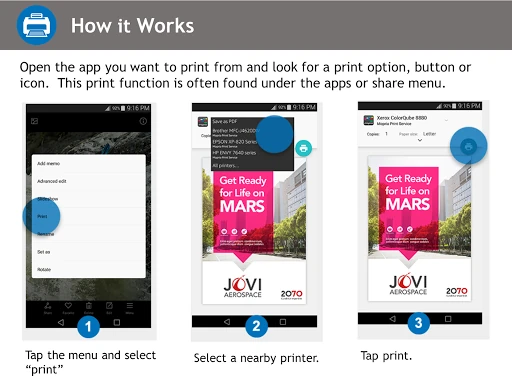
Printing can be started from the Android share menu in supported apps. That makes it useful for someone who needs to print a page or file while already viewing it, rather than first moving it into a dedicated printer app.
Mopria is most useful if your printer is certified for the service. An older or otherwise incompatible printer may not appear, so this is not a universal fix for every printer. If you mainly print to one device, its maker’s own app may be a better fit when that printer is not supported.
As a background printing service, it is intended for occasional use from other Android apps rather than as a standalone document editor. Its 10,000,000+ installs and 4.5-star rating across 55,760 ratings suggest broad uptake, though those figures do not confirm that a particular printer will work.